
Documentation Index
Fetch the complete documentation index at: https://developer.novacpayment.com/llms.txt
Use this file to discover all available pages before exploring further.
Overview
Payment links created on the Novac dashboard are reusable by default, you can share a single link with multiple customers and receive funds from each of them. This works well for general-purpose payment pages, but there are scenarios where you need more control.When you want to tie a checkout payment to a specific payment link, for example, to handle a one-time purchase, pre-fill customer details, or customize the checkout experience per transaction, you should initiate the checkout via the API instead.
paymentLinkReference from your dashboard and use it to create a checkout payment via the API.
Prerequisite
See details
See details
To get started you must have completed all the following item on the list below:
- Create a merchant account - Ensure that you have created an account and completed KYC.
- Obtain API keys - Required to authenticate with the Novac API.
- Create a payment link - You need an existing payment link to reference when initiating the checkout.
Create a Checkout Payment with Payment Link Reference
Creating a checkout payment with payment link reference via API allows you to further customize the experience for your customer. Every single payment link created on the dashboard comes with a unique Payment Link Reference, also known as thepaymentURL. You can also see this as initiating a transaction via a payment link reference, and it can be used for a one-time payment.
Finding your Payment Link Reference
You can find this reference by viewing the details of any payment link on your dashboard. Click on a single payment link from the list to view its details: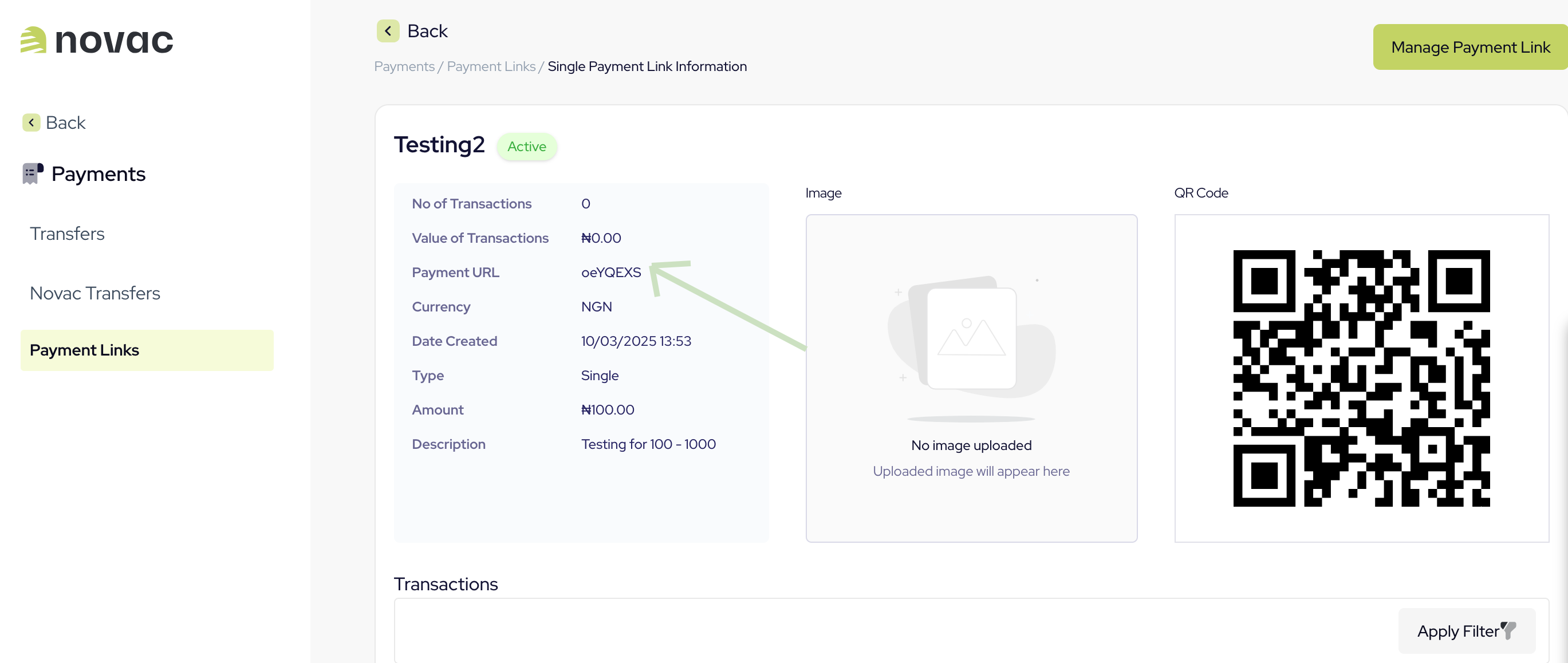
Request
Response
paymentRedirectUrl is used to redirect your customer to where they will complete the payment. It’s important to know that we expose the API that powers our checkout for a custom checkout experience.
What’s next?
Now that you’ve created a checkout payment, here are a few directions to explore:- Split payments: Add a split configuration to your request to automatically distribute incoming funds across multiple settlement accounts, either by flat amount or percentage.
- Complete the payment: Route your customer to the Novac prebuilt checkout to complete the payment, or use the custom checkout to build your own UI on top of our API.